Media Uploads (Web)
Overview
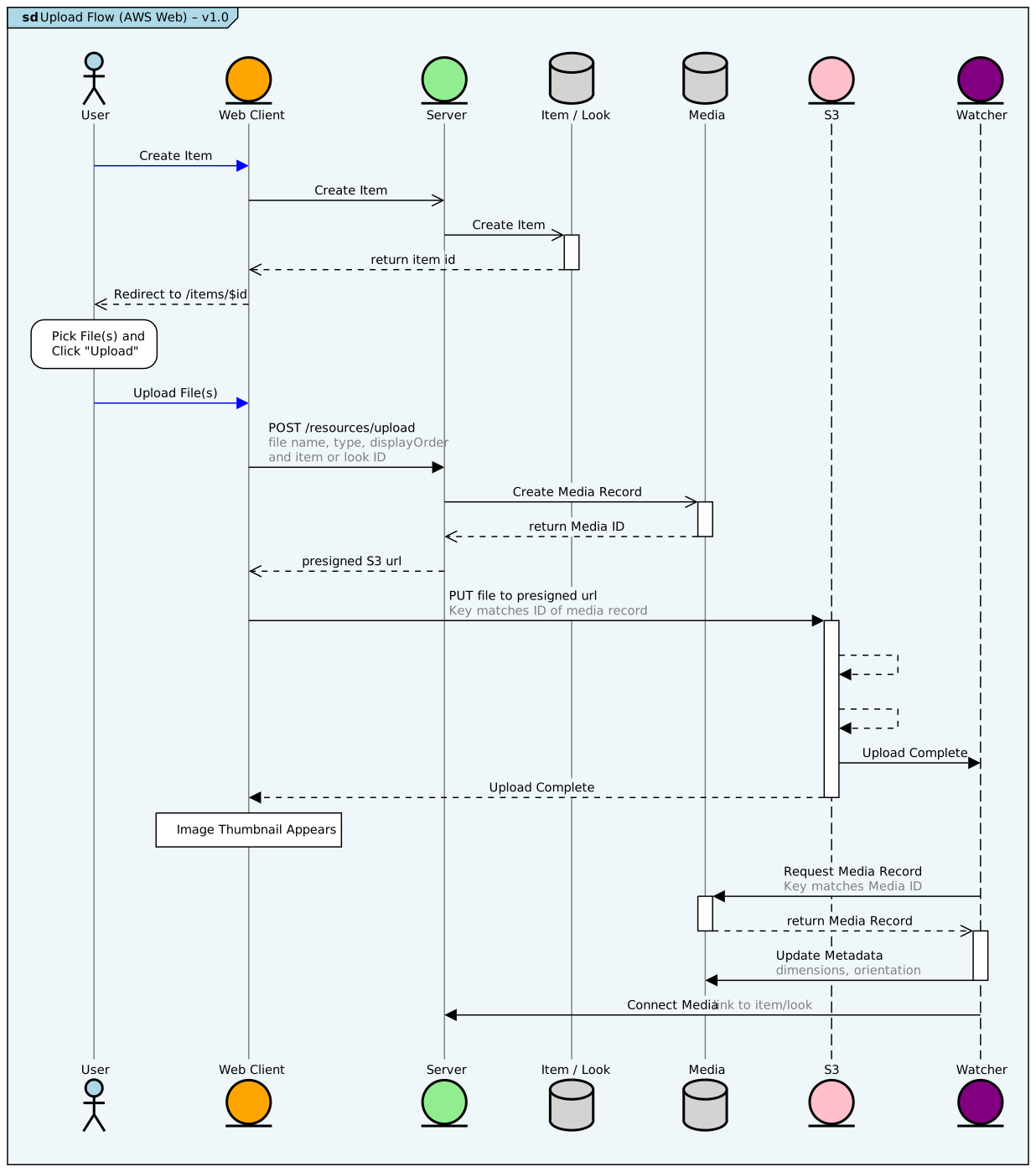
Section titled “Overview”- User creates or edits an existing Look or Item. In the upload section of the new/edit form. we pass the item or look ID as a
contextprop on the FileUploader component. - User picks one or more images with the standard file picker.
- For each file to be uploaded, client makes a POST request to the
/resources/uploadendpoint - Upload endpoint creates a new record in the
Mediatable with a CUID key and returns an AWS S3 Presigned Url - Client makes a PUT request for each file to the presigned url.
- When the file upload is complete, a lambda function Watcher is triggered by the
S3ObjectCreatedevent. - Watcher function decodes the S3 object to determine the key, and looks for a corresponding
Mediatable entry with that ID. If found, Watcher usessharpto determine file size, orientation and dimensions and writes that metadata to theMediatable. - Watcher writes an entry in the
itemsToMediaorlooksToMediajoin tables. This connects the media item with the item or look passed incontextabove
Diagram v7.16.2024
Section titled “Diagram v7.16.2024”(click to open at actual size)
Source Code
Section titled “Source Code”Source
-- render at https://sequencediagram.orgentryspacing 0.7frame #lightblue Upload Flow (AWS Web) – v1.0
participantspacing 3bottomparticipants
actor "User" as user #lightblueentity "Web Client" as web #orangeentity "Server" as server #lightgreendatabase "Item / Look" as item #lightgraydatabase "Media" as media #lightgrayentity "S3" as s3 #pinkentity "Watcher " as watcher #purple
lifelinestyle user #gray:1:solidlifelinestyle web #gray:1:solidlifelinestyle media #gray:1:solidlifelinestyle item #gray:1:solidlifelinestyle server #gray:1:solid
user -#blue> web: Create Itemweb ->> server: Create Itemserver ->> item:Create Itemactivate itemitem -->> web:return item iddeactivate itemweb -->> user: Redirect to /items/$id
rbox over user:Pick File(s) andClick "Upload"user -#blue> web:Upload File(s)web -> server:POST /resources/upload<color #gray>file name, type, displayOrderand item or look IDserver ->> media:Create Media Record
activate mediamedia -->> server:return Media IDdeactivate media
server -->> web:presigned S3 urlweb -> s3:PUT file to presigned url<color #gray>Key matches ID of media recordactivate s3s3 --> s3:s3 --> s3:s3 -> watcher:Upload Completes3 --> web:Upload Completedeactivate s3box over web:Image Thumbnail Appearswatcher -> media:Request Media Record<color #gray>Key matches Media IDactivate mediamedia -->> watcher:return Media Recorddeactivate media
activate watcherwatcher -> media:Update Metadata<color #gray>dimensions, orientationdeactivate watcher
watcher -> server:Connect Media <color #gray>link to item/look