Like Notifications
Overview
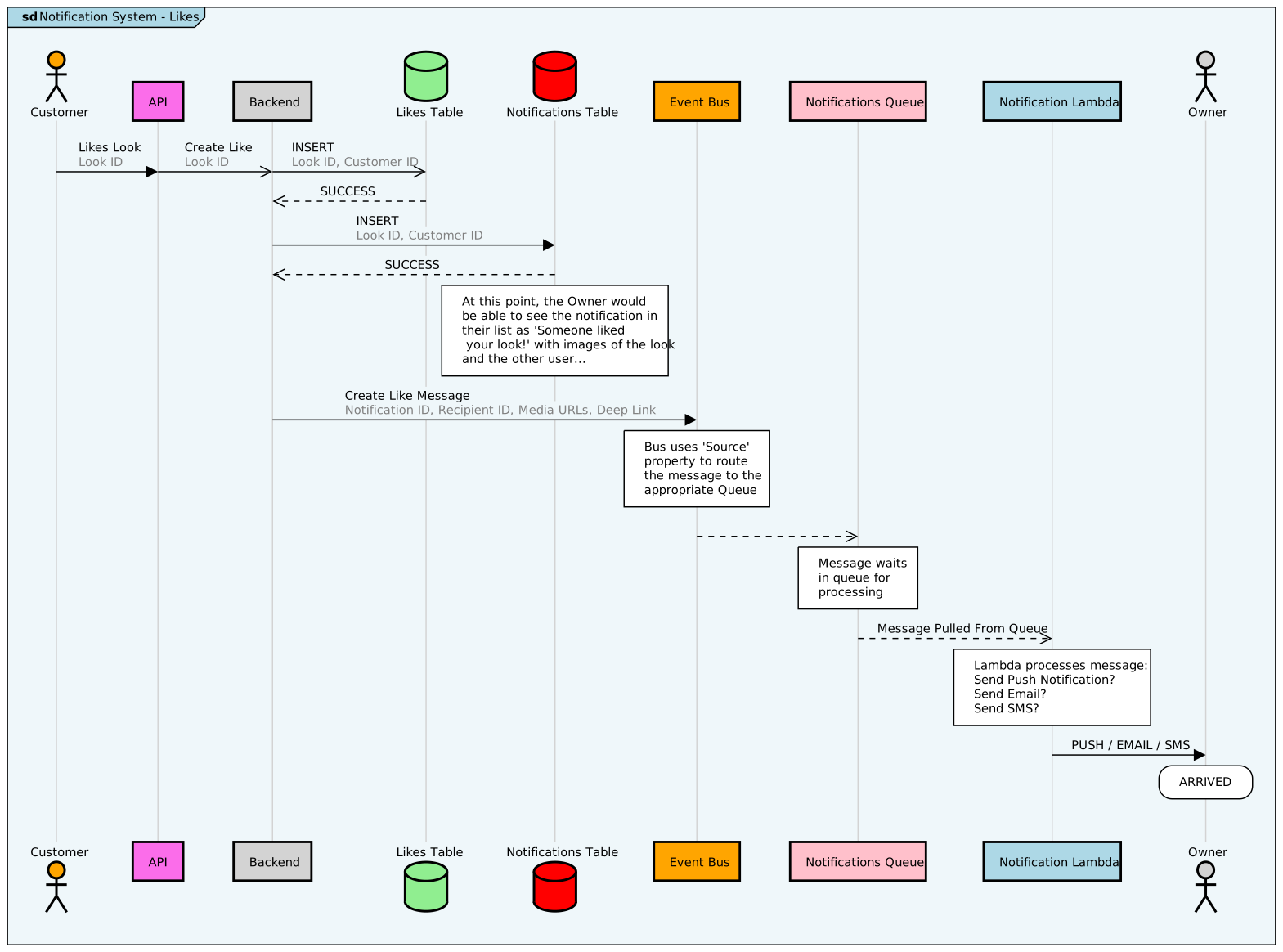
Section titled “Overview”- Mobile user likes some content
- POST request to /likes
- Backend inserts Like row into table
- Backend creates Notification row in table
- Backend sends a message to the event bus
- Event bus uses
sourceproperty to route message to SQS queue - Lambda watching SQS queue pull message for processing
- Lambda uses message detail to decide whether to PUSH, email, sms
- Owner receives notification(s)
Diagram v2.24.2025
Section titled “Diagram v2.24.2025”(click to open at actual size)
Source Code
Section titled “Source Code”Like Notifications - Diagram Source
entryspacing 0.7frame #lightblue Notification System - Likes
participantspacing 2entryspacing 0.5bottomparticipants
actor "Customer" as customer #orangelifelinestyle customer #lightgray:1:solid
participant "API" as api #FB6DEAlifelinestyle api #lightgray:1:solid
participant "Backend" as backend #lightgreylifelinestyle backend #lightgray:1:solid
database "Likes Table" as likes #lightgreenlifelinestyle likes #lightgray:1:solid
database "Notifications Table" as notes #redlifelinestyle notes #lightgray:1:solid
participant "Event Bus" as bus #orangelifelinestyle bus #lightgray:1:solid
participant "Notifications Queue" as notesQ #pinklifelinestyle notesQ #lightgray:1:solid
participant "Notification Lambda" as noteLambda #lightbluelifelinestyle noteLambda #lightgray:1:solid
actor "Owner" as owner #lightgreylifelinestyle owner #lightgray:1:solid
parallelcustomer -> api:Likes Look<color #grey>Look IDapi ->> backend:Create Like<color #grey>Look IDbackend ->> likes:INSERT<color #grey>Look ID, Customer ID</color>parallel endlikes -->> backend:SUCCESS
backend -> notes:INSERT<color #grey>Look ID, Customer IDnotes -->> backend:SUCCESS
box over notes:At this point, the Owner wouldbe able to see the notification intheir list as 'Someone liked your look!' with images of the lookand the other user...
backend -> bus:Create Like Message<color #grey>Notification ID, Recipient ID, Media URLs, Deep Link
box over bus:Bus uses 'Source'property to routethe message to theappropriate Queue
bus -->> notesQ:box over notesQ:Message waitsin queue forprocessing
noteLambda <<-- notesQ:Message Pulled From Queue
box over noteLambda:Lambda processes message:Send Push Notification?Send Email?Send SMS?
noteLambda -> owner:PUSH / EMAIL / SMS
rbox over owner: ARRIVED