Cart System - Add Items
Diagram v1.6.2025
Section titled “Diagram v1.6.2025”(click to open at actual size)
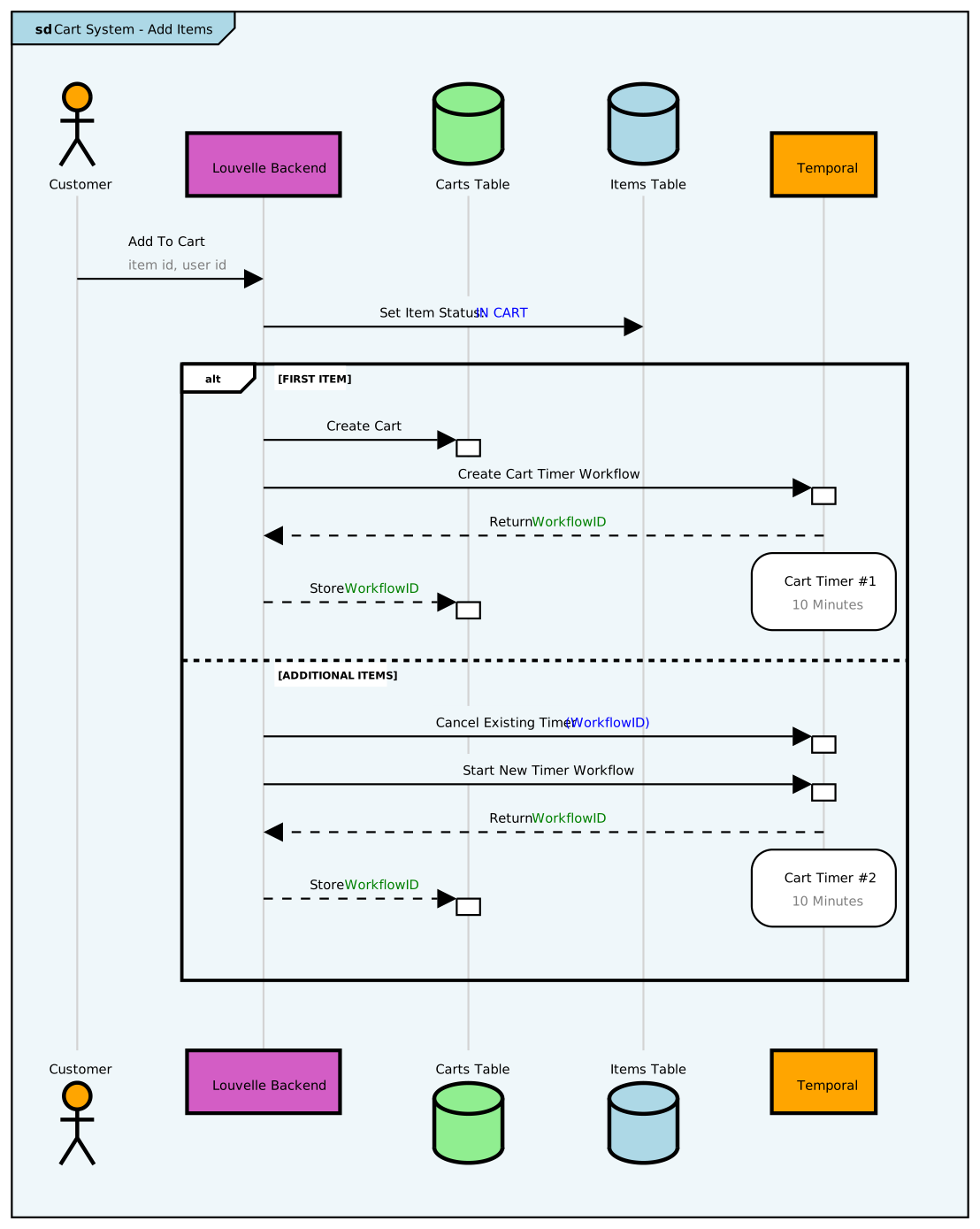
Source Code
Section titled “Source Code”Cart System - Add Items Source
-- render at https://sequencediagram.orgentryspacing 0.7frame #lightblue Cart System - Add Items
participantspacing 2entryspacing 0.5bottomparticipants
actor "Customer" as customer #orangelifelinestyle customer #lightgray:1:solid
participant "Louvelle Backend" as backend #D35DC5lifelinestyle backend #lightgray:1:solid
database "Carts Table" as carts #lightgreenlifelinestyle carts #lightgray:1:solid
database "Items Table" as items #lightbluelifelinestyle items #lightgray:1:solid
participant "Temporal" as temp #orangelifelinestyle temp #lightgray:1:solid
customer -> backend:Add To Cart<color #gray>item id, user id</color>
backend -> items:Set Item Status: <color #blue>IN CART</color>
space 0.1
# First Item
alt FIRST ITEM
backend -> carts : Create Cartactivate cartsdeactivateafter carts
backend -> temp: Create Cart Timer Workflowactivate tempdeactivateafter temp
temp --> backend:Return <color #green>WorkflowID</color>
parallelrbox over temp:<align center>Cart Timer #1<color #gray>10 Minutes</color>space -4parallelend
backend --> carts:Store <color #green>WorkflowID</color>activate cartsdeactivateafter carts
space
# Additional Items
else ADDITIONAL ITEMS
backend -> temp:Cancel Existing Timer <color #blue>(WorkflowID)activate tempdeactivateafter temp
backend -> temp: Start New Timer Workflowactivate tempdeactivateafter temp
temp --> backend:Return <color #green>WorkflowID</color>
parallelrbox over temp:<align center>Cart Timer #2<color #gray>10 Minutes</color>space -4parallelend
backend --> carts:Store <color #green>WorkflowID</color>activate cartsdeactivateafter carts
space 2
end